

Feature
Documented Signatures
Prepare supported PDFs for signature and retain selected workflow, consent, and completion records to support your own record-keeping.
Understand the supporting record
Orbis Sign records selected evidence about the signing workflow. These records can assist a review, but do not independently prove a person's civil identity, authority, or the legal effectiveness of a document.
- Completion Records: Keep a time-stamped record of signing activity.
- Recipient records: Tie signing activity to a specific destination email and recipient token.
- Event metadata: Timestamps and reported network or browser details where the relevant event captures them.
Match the signing method to the document
Before sending, confirm the approved PDF, the legal names of the parties, each signer's authority, and whether order matters. Orbis Sign supports sequential routing when one recipient should act before another and parallel routing when they may act independently. Neither choice resolves witnessing, deed, registry, notarisation, or agreed delivery requirements.
At completion, inspect the PDF and supporting record rather than relying on status alone. Event coverage varies, and reported browser or network details do not capture every interaction or independently identify a person. Completion records a SHA-256 hash of the completed PDF, which is checked again whenever that PDF is downloaded.
Use the practical audit-trail guide to interpret evidence and the contract signing checklist when authority and execution constraints matter. General information is not legal advice.
Online document signing for everyday agreements
Many routine business documents can be signed online, reducing printing, posting and scanning. Orbis Sign keeps the completed PDF with selected workflow records, to support your own record-keeping.
Some documents have special requirements, and these records do not independently prove someone's identity or authority. Check what your document needs before sending it.

How to sign documents online with Orbis Sign
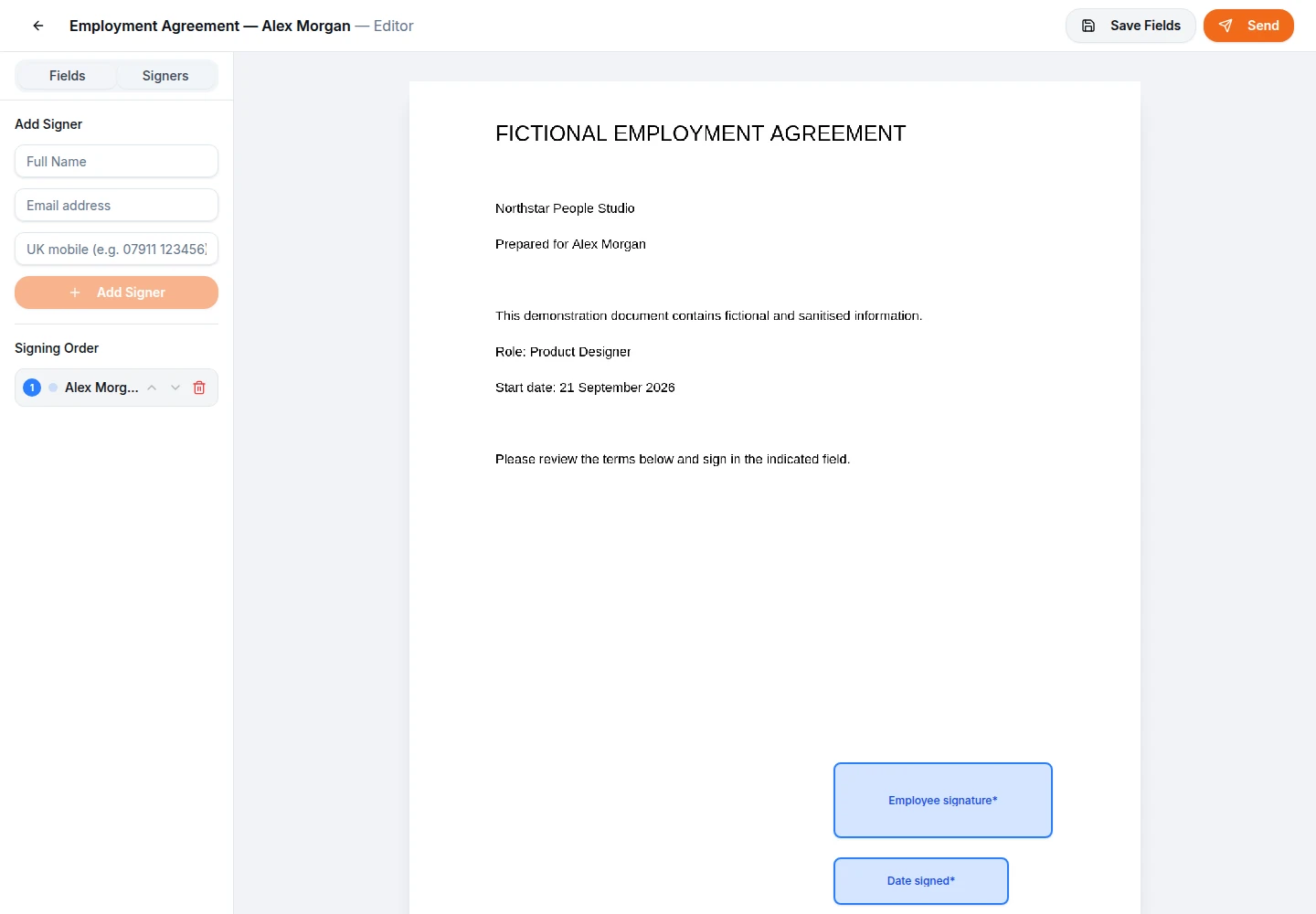
From the sender’s side, getting a document signed online follows a short path. You upload a PDF, add the people who need to sign and place their fields in the PDF editor, or start from one of your reusable templates. Then you choose the signing order, decide whether to ask for a passcode, set the deadline and send.
Each recipient gets their own unique link. Nobody needs an Orbis Sign account, and nobody needs to print, sign and scan. While the document is out, you can see who has opened, viewed and signed it, and resend the invitation to anyone who has not acted yet. When the last person signs, everyone receives the completed PDF and its audit certificate by email.
What your recipient sees when they sign
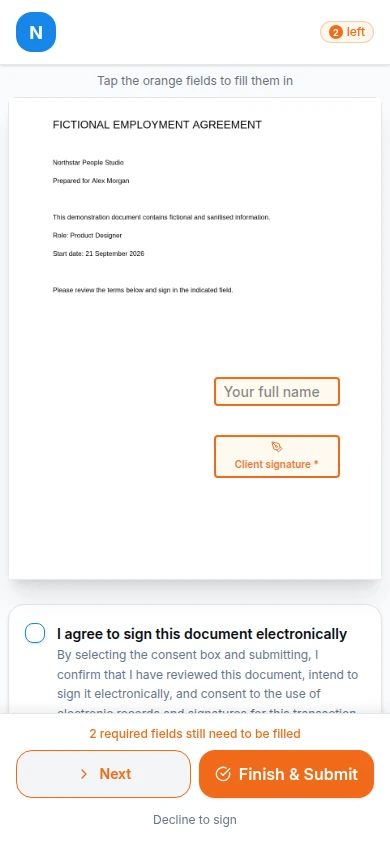
Your recipient opens the link in their browser on a phone, tablet or computer; there is no app to download. If you asked for a passcode, they first enter a six-digit code sent to their email address, which is valid for 10 minutes. They then see the document with their own fields marked, and only their own fields, plus any shared fields not yet completed.
Before signing, they tick a box to agree to sign electronically, and the version of the consent wording they accepted is recorded. They complete their fields and add their signature, either typed or drawn with a finger, stylus or mouse. There is no option to upload a picture of a signature. If they do not want to sign, they can decline and give a reason if they wish.

Sequential or parallel signing
Signing order is set for each document. Sequential signing is the default: the first person is invited, and the next is only invited once the one before has signed. It suits documents where order matters, such as a client signing before your director countersigns, or an employee accepting an offer before the business confirms it.
Parallel signing invites everyone at once, and they can sign in any order. It suits documents where each party acts independently, such as several directors acknowledging the same policy. Parallel signing is usually faster, because no one waits for anyone else, but it gives you less control over the sequence. Choose the order before sending, because recipients and their settings cannot be changed afterwards.

Email and text message invitations, and one-time passcodes
Invitations are sent by email from Orbis Sign’s sending address, with your company name shown as the sender and replies going to the support email in your business branding. Where SMS is enabled for your workspace, you can send the link by text message as well, or instead. Text messages can help with people who rarely check their inbox, such as tradespeople or temporary staff.
For documents where you want an extra check, you can require a one-time passcode by email. The signer has to enter the code before opening the document, and the certificate notes that the email address was verified. This shows that the person had access to that inbox at the time; it does not, on its own, prove who they are. Telling recipients to expect your request is a simple, sensible habit alongside it.

Deadlines, declines and cancelled documents
Every document has a deadline, which applies to the document and all of its signing links together. It is 7 days unless you change it, and you can set anything from 1 to 365 days. When the deadline passes, the document expires automatically and the links stop working. That stops an old offer or quote being signed months later than intended.
A recipient who declines, with or without a reason, cancels the document for everyone and all links stop. You can also cancel a document yourself at any point before it is completed, for example if the terms have changed. Because recipients cannot be edited once a document has been sent, cancelling and sending a corrected copy is the way to fix a wrong email address or a missing signer. Reminders are sent manually when you choose.

What happens when a document is completed
Once the final signer has finished, Orbis Sign writes the field values and signatures into the PDF itself, so the completed document reads as one file rather than a form with answers kept elsewhere. A SHA-256 hash of that completed PDF is recorded. When the PDF is later downloaded from the app, the hash is checked again, which helps show that the file has not changed since completion.
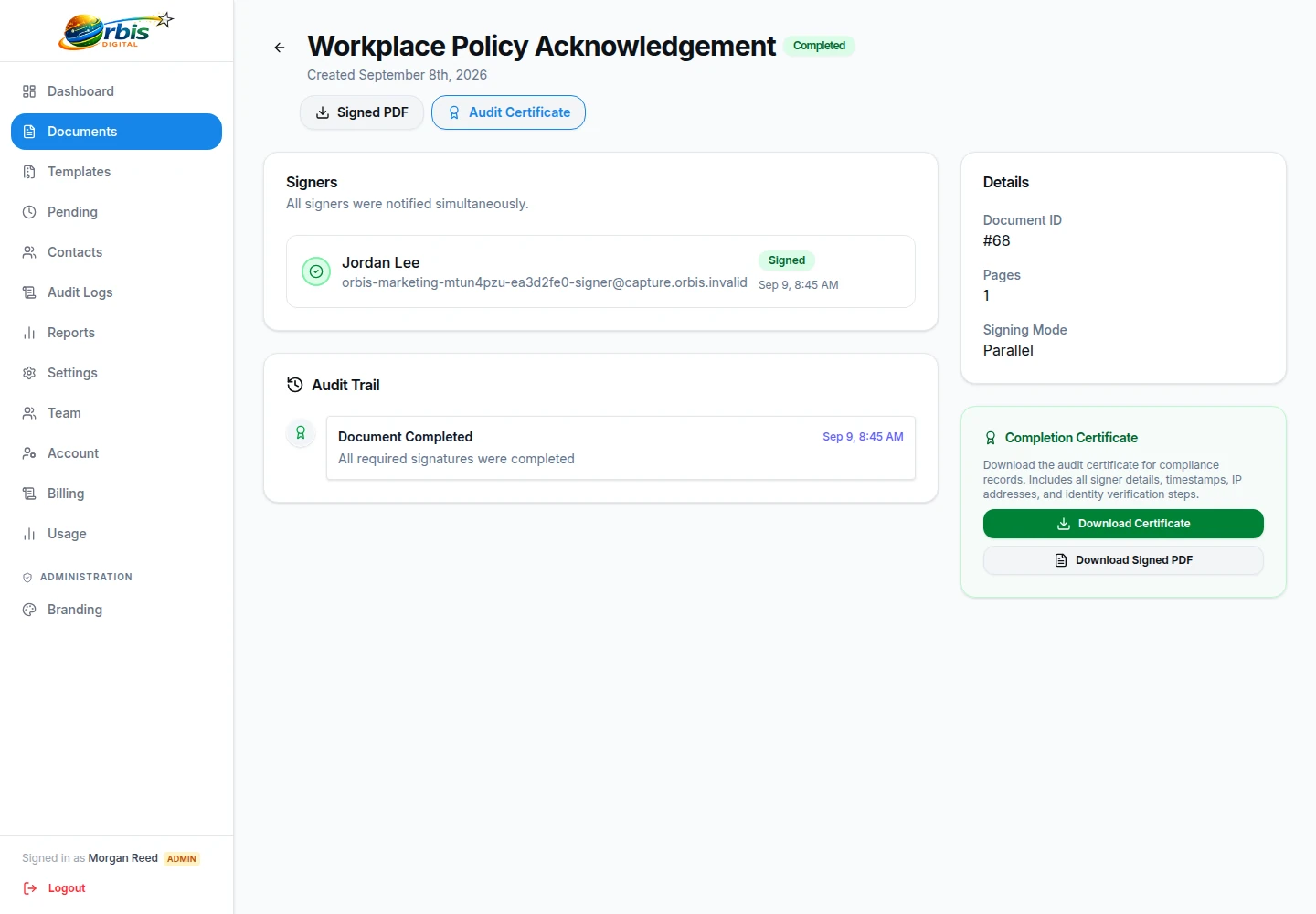
Every signer receives the signed PDF and the audit certificate by email, and so does your workspace support address if you have set one. People in your team with the right permissions can download both from the document’s page at any time. Documents are not deleted automatically; they stay in your workspace until someone with permission deletes them permanently.
Inside the audit certificate
The audit certificate is a separate PDF that sits alongside the signed document. For each signer it lists their name, email address, phone number where a text message was used, their status and the time they signed, the IP address recorded at signing, whether their email was verified by passcode and the version of the consent wording they accepted. Below that is a table of events with times, from sending through to completion, and the hash of the completed document.
Keep the certificate with the signed PDF. If a question is ever raised about a document, the two together show what was sent, to which contact details, and what happened when. They support your own record-keeping; they are not proof of identity, of someone’s authority to sign for a company, or of the legal effect of the document. For a fuller explanation, see how electronic signatures work.

Online document signing in the UK: the general position
In England and Wales, electronic signatures are generally capable of being legally valid and admissible. The Electronic Communications Act 2000 provides that electronic signatures are admissible in evidence, and the Law Commission’s 2019 report concluded that an electronic signature is generally capable of satisfying a statutory requirement for a signature. After leaving the EU, the UK kept a version of eIDAS in its law, which describes simple electronic signatures as well as advanced and qualified ones.
Some documents carry extra formalities. Deeds that need a witness, certain property and Land Registry transactions, some regulated or court documents, and wills are examples where you should check the requirements before using an online signature. This is general information, not legal advice; if you are unsure about a particular document, ask a solicitor. Our page on electronic signatures in the UK covers the background.

What kind of electronic signature Orbis Sign provides
Orbis Sign provides simple electronic signatures: a typed or drawn signature, given after the signer agrees to sign electronically, with a record of the signing process. It does not provide advanced or qualified electronic signatures, and it does not use PKI certificates or apply digital-signature seals to documents. For the everyday agreements most small businesses send, such as terms of business, engagement letters, NDAs and employment paperwork, a simple electronic signature is commonly used.
If a regulator, a counterparty or a particular process requires an advanced or qualified signature, Orbis Sign is not the right tool for that document. Being clear about this up front is better than finding out after a document has been signed. The difference between electronic and digital signatures is explained in our resources.

Online document signing: common questions
Can my recipient sign without creating an account?
Yes. Recipients never need an Orbis Sign account. Each one receives a unique link by email, or by text message where SMS is enabled for your workspace, and signs in their web browser on a phone, tablet or computer. There is no app to install.
Can I add someone who only needs a copy?
No. Every recipient in Orbis Sign is a signer and needs at least one field. When a document is completed, each signer receives the signed PDF and the audit certificate by email, and your workspace support address receives them too if one is set. You can also download both and share them yourself.
What happens if a recipient declines to sign?
The recipient can decline and give an optional reason. Declining cancels the document for everyone and all signing links stop working. You can see the decline and any reason on the document’s page, then prepare and send a revised version if appropriate.
How long do signing links stay open?
Links and the document share a single deadline. It is 7 days by default and can be set between 1 and 365 days when you send. After the deadline the document expires automatically and the links no longer work, so you would need to send a new copy.
Does Orbis Sign provide qualified electronic signatures?
No. Orbis Sign provides simple electronic signatures with a record of the signing process. It does not offer advanced or qualified electronic signatures, PKI certificates or digital-signature seals. If a document needs one of those, use a service designed for it. This is general information, not legal advice.
Can I change a recipient after sending?
No. Recipients cannot be changed once a document has been sent. If an email address is wrong or a signer is missing, cancel the document, which stops all its links, and send a corrected copy. Starting from a template makes resending quick.