
Orbis Sign

Recruitment operations

Electronic signing for recruitment documents and candidate workflows

Give recruiters a repeatable route for routine terms, candidate acknowledgements and client paperwork while keeping authority, privacy and employment checks outside the signature box.

Keep candidate paperwork moving without losing the hand-off

A recruitment team may coordinate candidate terms, privacy acknowledgements, client agreements and internal approvals across consultants, operations and external recipients. Orbis Sign lets an account holder prepare a supported PDF, assign fields to each person and choose whether recipients act in order or in parallel.

The platform records document states and selected activity so colleagues can see whether a request remains pending or has completed. Manual reminders support follow-up. Provider-reported delivery or open events are signals, not proof that a candidate personally read a document.

Recruitment controls worth standardising

  • Confirm the correct employing or client entity before sending.
  • Separate right-to-work, identity and reference checks from electronic signing; a signature workflow does not perform those checks.
  • Limit special-category or unnecessary candidate information in uploaded documents.
  • Use templates only after checking that current terms and field ownership remain correct.
  • Define who may remind, cancel, replace and archive each document type.

Candidate experience and privacy

Standard recipients can follow a document-specific browser invitation without creating an Orbis Sign account. Before rollout, test the journey on a phone, give a genuine contact for questions and avoid artificial urgency. Candidate data remains subject to the recruiter’s privacy duties and retention decisions; software availability does not justify keeping every record indefinitely.

Review how to interpret audit records and the current security overview before choosing what information to process.

This is general practical information, not legal advice. Electronic execution is not suitable for every document. Check the law, agreed formalities and your organisation’s requirements for the transaction.

Map a recruitment signing workflow

Start a 7-day free trial with no card, or tell us what you need to send, who needs to act and how you need to retain the result.

E-signature for recruitment agencies: where it fits

Recruitment moves quickly, and paperwork is often what slows a placement down. Candidates need to agree terms before they are put forward, contractors need agreements in place before they start, and clients need to sign terms of business before an introduction is made. Most of these are short PDFs with one or two signers, sent many times a week.

Orbis Sign lets a consultant upload the PDF, place the fields, send it by email and see who has signed, all from one list. Candidates and clients sign in a browser with no account. The completed PDF and audit certificate go to every signer and are available to your team to download and file in your own records.

A man typing on a laptop in a colourful office

Candidate terms e-sign on a phone

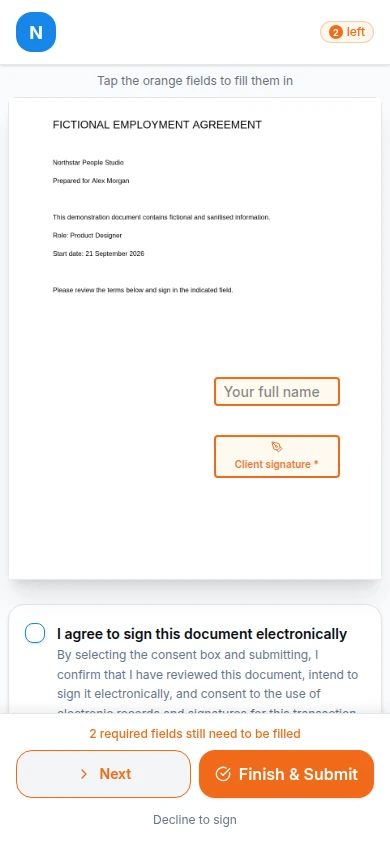
Most candidates will open their invitation on a phone, often between interviews or on the way to work. Orbis Sign’s signing page works in a mobile browser with no app to install. The candidate ticks to consent to signing electronically, fills in their fields and types or draws their signature with a finger.

Where SMS is enabled for your workspace, invitations can go by text message as well as, or instead of, email, which helps when a candidate’s inbox is busy. Before rolling it out, send a test document to your own phone so you know exactly what candidates will see. Our mobile signing page covers the signing screens in more detail.

Orbis Sign mobile signing screen showing a recipient signing on a phone

Sign contractor agreements online

Contractor agreements often have more than one party: the contractor, sometimes their limited company, and the agency. A sequential route lets the contractor sign first and the agency director countersign once the contractor has agreed. Where the contractor signs for their own company, a company field lets them confirm the company name.

Signing the agreement is only one part of engaging a contractor. Employment status, off-payroll working decisions, right-to-work checks and any umbrella or payroll arrangements are separate matters that Orbis Sign does not handle. Keep them in the processes your compliance team already runs. This is general information, not legal or tax advice, and our contract signing software page has more on sending agreements generally.

Two colleagues talking at a desk

Client terms of business without the chasing

Many agencies want signed terms of business in place before a first introduction. For example, a recruitment agency might send its standard terms to a new client’s hiring manager in the morning and have them back by lunch, rather than waiting for a printed copy to come back by post.

Send the terms to the person who actually has authority to sign for the client, which is not always the hiring manager. Orbis Sign records who signed and when, but it cannot confirm that person’s authority to bind their company, so check it as you would on paper. Interim and temporary worker agreements with a client can follow the same route.

A business meeting on sofas

Choosing fields for candidate documents

Candidate documents work best when they ask for as little as possible.

Fields that help

A signature and date signed for each person, a name field, and perhaps phone, email or address fields where the candidate needs to confirm them. A sender-filled text field can show the role, rate or start date so the candidate sees it but cannot change it. A checkbox can record that they have read a privacy notice.

Information to keep out

Avoid collecting bank details, national insurance numbers or health information through signing fields unless there is a clear need and a lawful basis. Collect those through the systems designed for them. Candidate data remains your responsibility, and keeping less of it is usually the safer choice.

Overhead view of hands on a laptop beside paper notes

Templates for consultants who send the same documents daily

A consultant who sends candidate terms several times a day should not be placing fields by hand each time. Save each standard document as a template, and using it creates a draft with the fields already placed for Signer 1, Signer 2 and so on. The consultant adds the candidate’s name and email and sends.

Templates are shared across the workspace, and permissions decide who can create, edit, use or delete them. By default, standard users can use templates but not create them, which keeps your approved terms under the control of operations or compliance. When your terms change, update the template before anyone sends the old version.

Three young colleagues looking at a laptop together

Keeping track across a busy recruitment desk

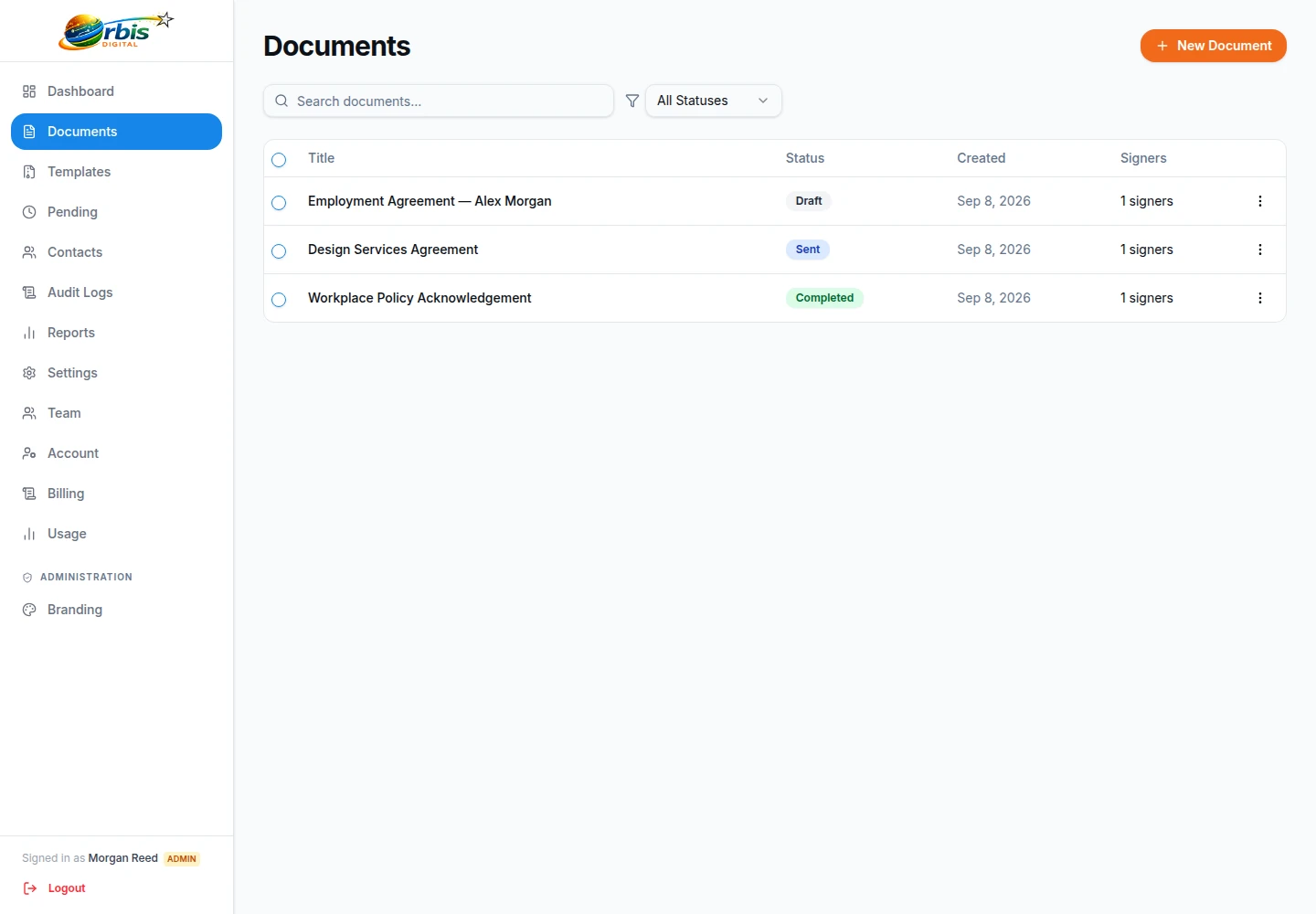
The documents list shows every document with its status, from draft and pending through partly signed and completed to cancelled, declined or expired. Search by title and filter by status to find, say, every set of candidate terms still waiting. Open a document to see whether each signer has opened, viewed or signed it, then resend to pending signers when a reminder is needed.

Reports show a status breakdown, documents sent per month and the average time to sign, with a CSV export. A contacts list builds itself from past signers, giving you a record of candidates and clients you have sent to, with its own CSV export. The document tracking page explains each status.

Orbis Sign document list screen showing search and a status filter

Deadlines, declines and corrections

Every document has one deadline for its signing links, seven days by default, which you can set from 1 to 365 days. A short deadline suits a time-limited offer of work; a longer one suits a client who is slow to sign terms. When the deadline passes, the document expires automatically.

A candidate who disagrees with something can decline and give a reason, which cancels the document and stops all its links. You can also cancel a document yourself before it completes. Recipients cannot be changed once sent, so if the wrong email address went out, cancel and send a corrected copy. That keeps a clean record of what each person was actually asked to sign.

A woman reading her phone beside a window

Setting up an agency team, and what it costs

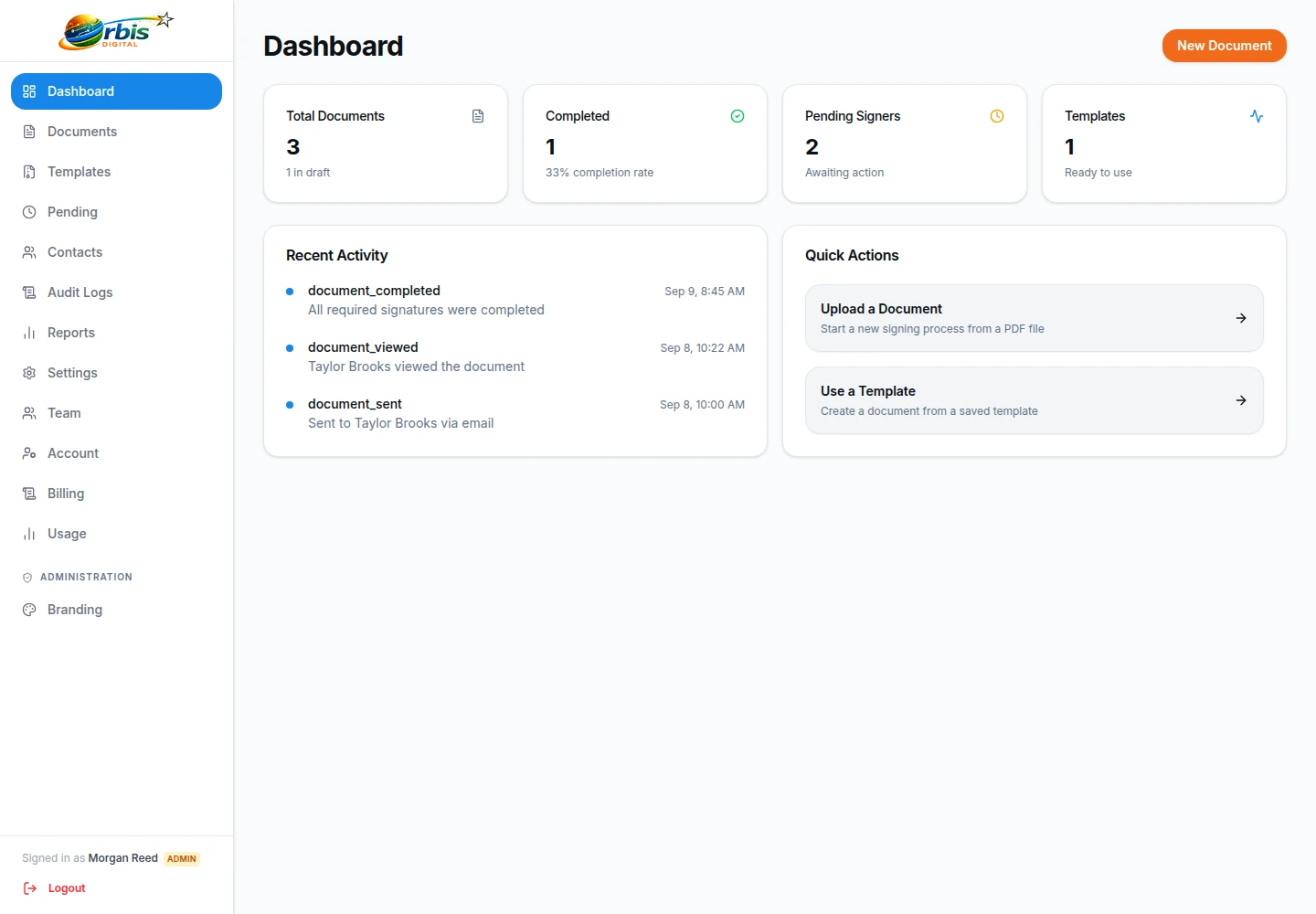
Invite consultants, team leads and operations staff by email, and give each person the Owner, Admin or User role, or a custom role with only the permissions they need. Two-factor authentication with an authenticator app is available, and a workspace policy can require it for chosen roles. The dashboard gives managers a quick view of statistics and recent activity.

One plan costs £8.99 a month for up to 500 documents sent for signature, with no per-user charge, which suits agencies where headcount changes through the year. At the monthly limit, sending pauses rather than adding charges. For onboarding employees rather than placing candidates, see HR onboarding, and pricing has the 7-day free trial.

Orbis Sign dashboard screen showing statistics and recent activity

Recruitment e-signatures: common questions

Can recruitment agencies use electronic signatures for candidate terms?

Candidate terms, client terms of business and contractor agreements are commonly signed electronically, and electronic signatures are generally capable of being legally valid in England and Wales. Check any document with special formalities before sending it. This is general information, not legal advice.

Does Orbis Sign check a candidate’s right to work?

No. Orbis Sign does not carry out right-to-work, identity, reference or background checks. It handles the signing of a document and records that process. Keep those checks in the systems and procedures your agency already uses for them.

Do candidates need to download an app or create an account?

No. Each candidate receives a unique link by email, and by text message where SMS is enabled for your workspace. They sign in the browser on their phone, tablet or computer, typing or drawing their signature after ticking to consent to sign electronically.

Can a contractor sign on behalf of their limited company?

Yes, a contractor can sign and confirm their company name in a company field. Orbis Sign records who signed and when, but it cannot confirm that the person has authority to bind the company. Check authority in the same way you would for a paper agreement.

What happens if a candidate declines the document?

The candidate can decline and give an optional reason. Declining cancels the document and stops every signing link for it. You can then correct the terms if needed and send a new copy, which keeps a clear record of each version sent.

How many documents can an agency send each month?

The single plan covers up to 500 documents sent for signature each month for £8.99, with no charge per user. If you reach the limit, sending pauses until the next month and there are no overage charges. A 7-day free trial is available with no card needed.