

Feature
Frictionless Mobile Signing
Recipients can review and complete assigned fields in a supported browser on a phone, tablet, or computer.
No recipient account or signing app
A recipient uses the unique link sent for the document to open the signing workflow in a browser. The standard recipient flow does not require an app download or an Orbis Sign account.
- Responsive design: The signing interface is designed for smaller screens.
- Required fields: The interface identifies fields that must be completed before submission.
- Completion access: Once completed, the final PDF is prepared for download and delivery.
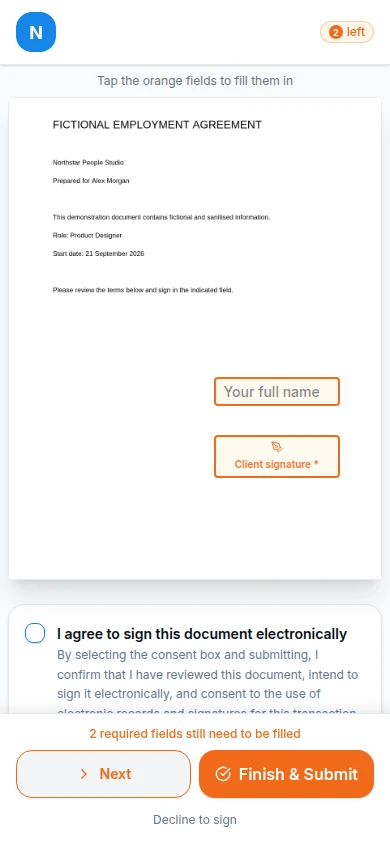
Prepare for a small-screen recipient journey
Mobile access is most useful when the document itself remains readable. Send a final PDF with legible text, avoid unnecessarily dense schedules, and place fields where they do not obscure nearby wording. Recipients should have enough time and context to review the whole document rather than being directed only to a signature box.
Test a representative invitation on the phones and managed browsers your recipients commonly use. The interface is responsive, but that is not a promise that every browser, extension, accessibility configuration, or unusual PDF will behave identically. Give recipients a genuine contact route if the file will not open or the named person is wrong.
A document-specific link shows access to that invitation; it does not universally prove civil identity or signing authority. Choose additional checks according to the transaction and read how electronic signatures work before setting a mobile-first process.