

Solutions
Paperwork, sorted.
Prepare routine agreements, supplier contracts, and customer forms for browser-based signing when the document is suitable.
Stop chasing signatures
Small business owners wear too many hats to waste time tracking down paperwork. Orbis Sign brings order to the chaos.
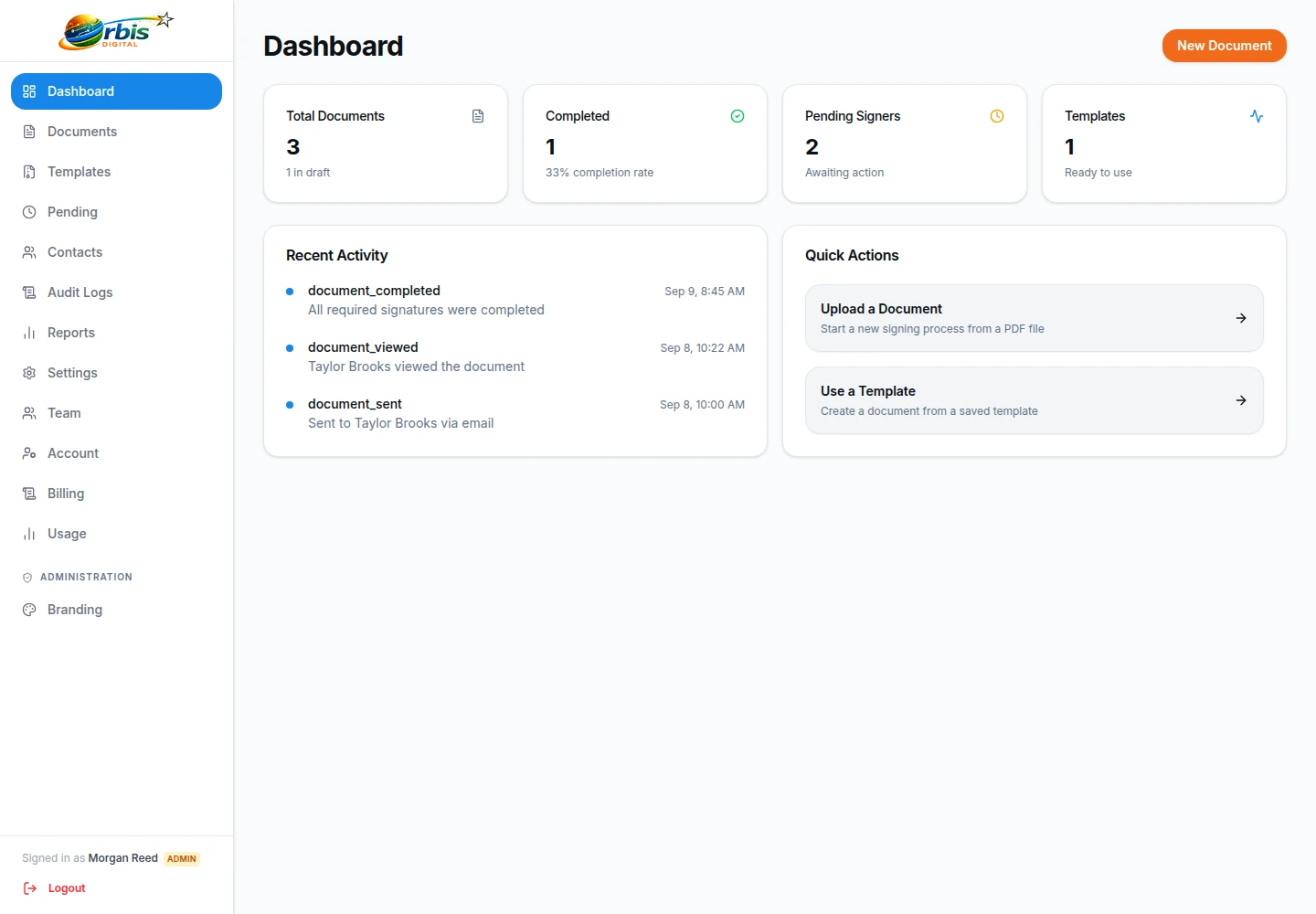
- Supplier Agreements: Send agreed terms through a structured signing workflow.
- Customer Forms: Have clients sign intake forms on their phones before they arrive.
- Partnership Contracts: Retain the completed PDF and selected workflow records.
Choose a small, repeatable process first
Start with one routine, low-risk document such as an approved service agreement or supplier acknowledgement. Name who owns the wording, who may send it, and who checks completion. Export the final version to PDF, verify recipient details, and decide whether several signers should act sequentially or in parallel.
After completion, inspect and file the PDF with its supporting record instead of leaving record-keeping undefined. A status or email-open signal does not prove that a named person read the terms. Required fields help prevent assigned blanks, but they do not validate the answers or a signer's authority.
Do not automatically reuse the same route for deeds, guarantees, witnessed documents, regulated transactions, or paperwork with specialist filing rules. Read how electronic signatures work, then assess the software evaluation checklist against the way your business actually operates.
One straightforward plan
Orbis Sign is £8.99 per month and includes up to 500 documents for signature each month.
View pricingSimple e-signatures for small teams
If you only need to send terms, quotes and agreements, you do not need a complicated system. Orbis Sign has one published plan at £8.99 a month for up to 500 documents, with a 7-day free trial and no card to start.
Your recipients do not need an account, which removes one more obstacle to getting a document back.

E-signature for small business UK owners who are short of time
A typical day in a small business does not leave much room for admin. You quote for a job in the morning, chase a supplier at lunch and only get to the paperwork after closing. When a customer needs to sign something, the old routine of printing, posting, waiting and scanning adds days to a decision that could take minutes.
Electronic signing removes most of that waiting. You prepare the document once on your laptop, send it, and the customer signs on whatever device is in their hand. You can see when they have opened it, and the signed PDF arrives in both inboxes when they finish. Nothing about the document itself has to change: if you already have a quote template or terms of business in Word, save it as a PDF and you are ready.

Sign quotes and terms online in a few steps
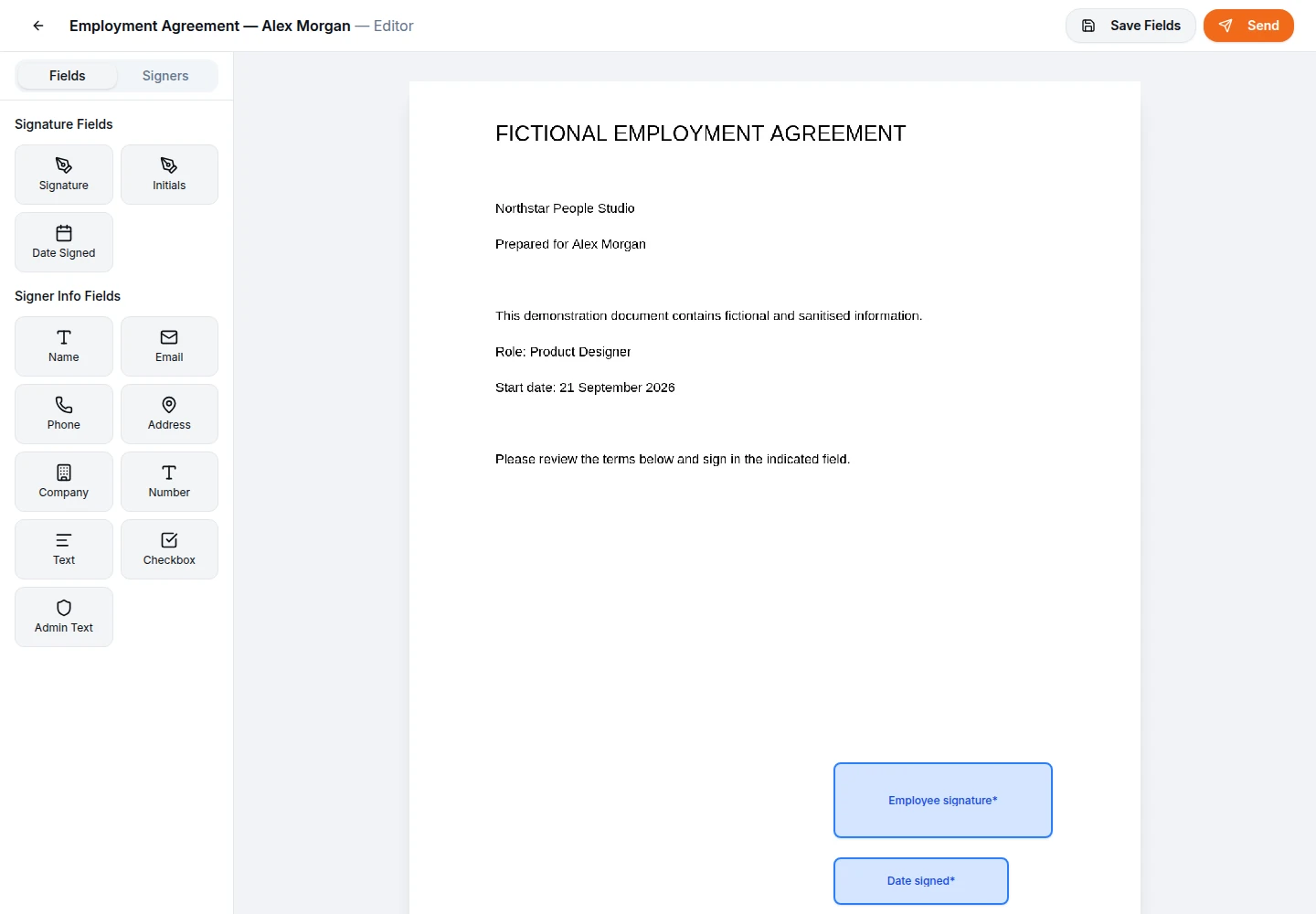
The process is the same whatever the document. Upload the PDF, which can be up to 10 MB with no page limit, then open the field editor and place a signature box, a date-signed field and anything else you need the customer to complete, such as their name, address or phone number. A sender-filled text field lets you add a job reference or price that the signer can see but cannot edit.
Adding the customer and sending
Enter the customer’s name and email address, and their mobile number if you want the invitation to go by text message as well, where SMS is enabled for your workspace. The link stays open for seven days by default, and you can choose anything from one day to a year.
When the signed copy comes back
Once the customer signs, their details and signature are written into the PDF and you both receive the completed copy and an audit certificate by email. You can also download both from your document list.
Worked example: a building firm accepting quotes
Imagine a small building firm that prices a kitchen extension on a Monday. In the past the owner would email a PDF quote, ask the customer to print, sign and scan it, and then wait. Often the job slipped down the customer’s list and the firm lost its slot in the diary.
With electronic signing, the owner might upload the same quote, add a signature, a date and a checkbox confirming the customer has read the terms on the final page, and send it before leaving the site. The customer signs on their phone that evening. The firm’s owner sees the document marked as completed the next morning and can book materials with a signed acceptance on file.
This is a hypothetical illustration, but it shows the point: the quote and terms do not change, only the time it takes to get them back.

Worked example: a shop with supplier and wholesale terms
Small retailers sign more than you might expect. A clothing shop could have wholesale account terms with suppliers, consignment agreements with local makers and a simple agreement for a pop-up event. Each one is short and routine, but each tends to sit in a pile waiting for a signature.
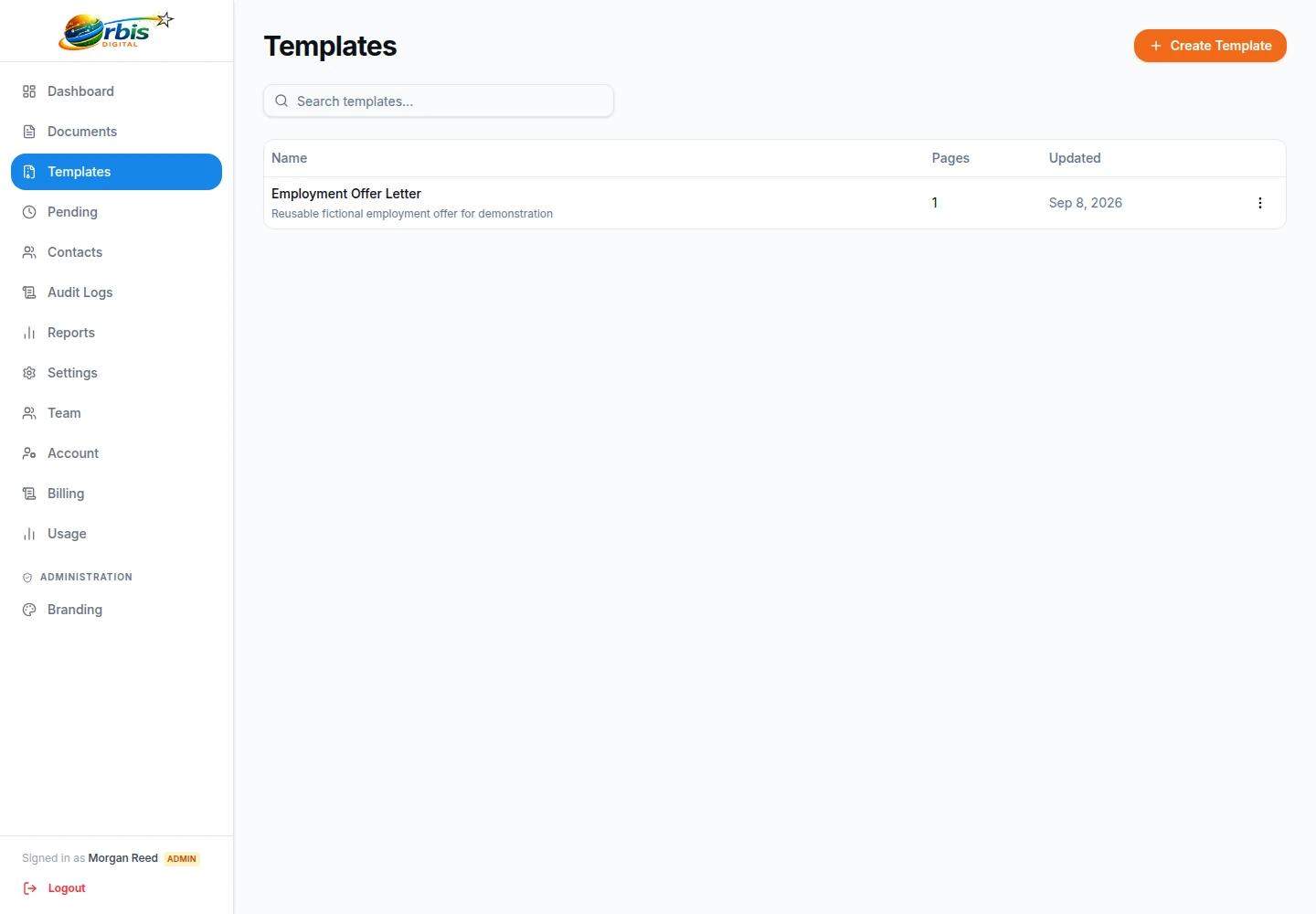
For example, an independent boutique taking stock from three local designers might save its consignment agreement as a reusable template, with fields already placed for the maker’s name, address and signature. Each time a new maker joins, the owner uses the template, adds the maker’s email address and sends. The maker signs in their browser, and both sides keep the signed PDF. This is an illustration of how the feature can be used, not a description of a particular customer.

Worked example: hospitality bookings and staff paperwork
Cafes, restaurants and small venues often need a signature on private hire agreements, event booking terms and supplier contracts, and they also take on seasonal staff who need written terms. The people involved are rarely at a desk.
A cafe owner taking a private party booking might send the hire terms to the organiser as soon as the date is agreed, with fields for the organiser’s name, phone number and signature, and a sender-filled field showing the deposit agreed. Where the organiser and a second person both need to sign, the owner can let them sign in parallel so neither waits for the other. If the booking falls through, the organiser can decline with a reason, which cancels the request and closes the link. Again, this is a hypothetical example.

Worked example: a sole consultant’s engagement terms
Consultants and freelancers working alone often send a short engagement letter or terms of business at the start of each project. Getting it signed before work begins avoids awkward conversations about scope and fees later.
A self-employed bookkeeper, for instance, might keep one engagement letter template, use it to create a new draft for each client, and add the client’s details before sending. Where the client is a company with two directors who both need to sign, the bookkeeper can send to both, choosing sequential order so the second director only receives the link after the first has signed. For larger advisory firms, our professional services page goes further into engagement letters and renewals.

Customers sign on their phone, with no app
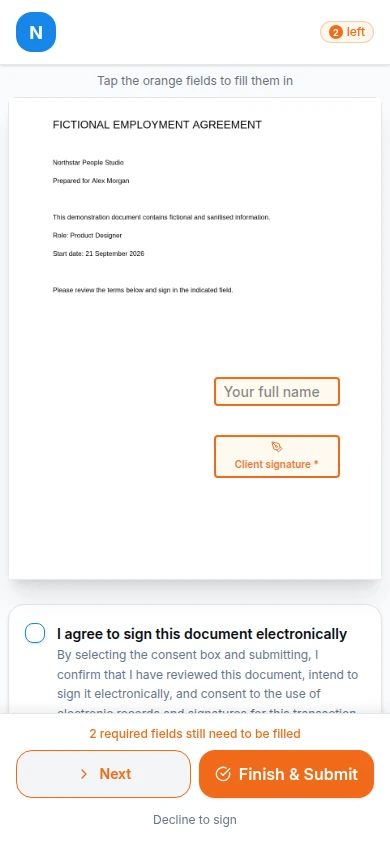
Most of your customers will open the invitation on a mobile. The signing page works in an ordinary phone browser, so there is nothing to install and no account to create. The customer reads the document, completes the fields assigned to them, ticks a box to agree to sign electronically and then types or draws their signature.
Because small screens make long documents harder to read, it helps to keep the PDF clear, avoid tiny print and send a test copy to yourself first. If you want an extra check that the person opening the link controls the email address you used, you can switch on a one-time passcode for that document, which sends a code to the signer’s email that lasts ten minutes.
Cheap electronic signature software without per-user fees
Many e-signature products price per user, which means a business pays more each time someone new needs to send a document. Orbis Sign has one plan at £8.99 a month that covers up to 500 documents sent for signature, and you can add as many team members as you need without changing the price.
If you reach 500 documents in a month, sending pauses until the next month rather than adding an overage charge, so the bill stays predictable. There is a seven-day free trial with no card needed, which is enough time to send a real quote or agreement and see the process from the customer’s side. Full details are on the pricing page.

What to keep on paper or check first
Electronic signatures are generally capable of being legally valid in England and Wales, and the Electronic Communications Act 2000 provides that they are admissible in evidence. That covers a great deal of everyday small business paperwork. Some documents have extra requirements, though: deeds that need a witness, personal guarantees in some forms, certain property and land registry transactions, and some regulated agreements.
Orbis Sign provides simple electronic signatures, not advanced or qualified electronic signatures, and its records support your own record-keeping rather than proving identity or authority on their own. If you are unsure about a particular document, our guide to electronic signatures in the UK is a good start. This is general information, not legal advice.
Small business e-signatures: common questions
Can I send a Word document for signature?
Not directly. Orbis Sign accepts PDF files only, up to 10 MB in the browser. In Word, or most other word processors, choose Save as PDF or Export to PDF and upload that file. Password-protected or damaged PDFs are rejected, so remove any password before uploading.
Will my customers know the request is from my business?
Invitation emails show your company name as the sender name, and replies go to the support email set in your branding. You can add your logo and colours to the signing page, emails and certificate. A small Powered by Orbis Sign note still appears, and it is sensible to tell new customers to expect the email.
What happens if a customer does not sign?
You can see whether they have opened and viewed the document. Reminders are sent manually: you resend the invitation to anyone still pending. If the deadline passes, which is seven days unless you change it, the document expires and the link stops working, and you can send a fresh copy.
I made a mistake after sending. Can I fix it?
Recipients cannot be changed once a document is sent. Cancel the document, which stops all its links, then correct the PDF or recipient details and send a new copy. If you use a template, check it before the next send so the same mistake does not repeat.
Can I take a signature in person on my own tablet?
Every recipient signs through their own unique link, which is sent by email or text message. In practice, a customer standing with you can open that link on their own phone and sign there and then. There is no separate in-person signing mode.
How long are signed documents kept?
Orbis Sign does not delete documents automatically. They stay in your workspace until you choose to delete one permanently. Each signer also receives the signed PDF and the audit certificate by email, and you can download both for your own files at any time.